
Start with the design inputs
An AS 1684 span table gives an answer for a defined framing case. The timber grade, member size, loads and supports must match that case. This guide helps you collect those inputs and read the result. It does not supply permitted spans.
Choose the right framing route
NCC 2022 H1D6(4) lists several timber design routes. The AS 1684 split is:
| Reference | What the NCC calls it up for |
|---|---|
| AS 1684.2 | Residential timber framing in non-cyclonic areas |
| AS 1684.3 | Residential timber framing in cyclonic areas |
| AS 1684.4 | Simplified residential timber framing in non-cyclonic areas |
Each part has its own scope. H1D6 also lists AS 1720.1 for timber design and AS 1720.5 for nailplated roof trusses. These are not interchangeable sets of tables. A design outside an AS 1684 route needs a route that covers it.
Use the edition called up for your job, including state changes. These clause links refer to NCC 2022. Start at the Australia hub to check the local code context. A newer book on sale does not by itself change an approved design.
Read a table as a complete entry
Keep this input list beside the plans. Some tables use load width; others need a different load measure. Use the headings and sketch for the chosen member.
| Input | What to match |
|---|---|
| Member | Joist, bearer, rafter, lintel or other named member |
| Timber | Grade, actual section and product type |
| Layout | Spacing, span case, supports and any overhang |
| Loads | Floor or roof loads and the stated load measure |
| Wind | The job’s assessed wind class where the table uses it |
| Reference | Part, edition, supplement, table and all notes |
A cropped row loses the facts that make the answer useful. Keep the table heading, notes and support sketch with your record. Use the table’s definition of span. Do not treat a stock length as a permitted span.
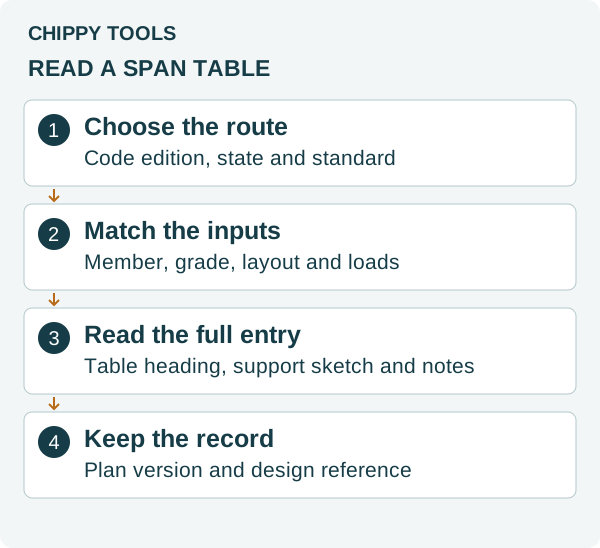
Chippy Tools reading checklist. Code routes: NCC 2022 H1D6(4). No licensed table or span values are reproduced.
A useful check before ordering
Suppose the plan calls for a joist over a middle support. The supplier sends a single-span table entry. The stock may look right, but the support case does not match. Ask for the correct entry or a checked design detail before ordering. Do the same if the grade or floor finish changes.
Record the plan version and member mark beside the table reference. Keep unresolved questions with that record. A member size alone leaves out the joints, bracing and rest of the frame.
Next steps
Read the joist input guide or rafter guide for the member you are checking. Use the Chippy Tools code-check sheet to keep the source and plan details together.
Sources
Publisher links identify the standards. This review did not inspect or reproduce their licensed span tables.
Related building rules
More Australia rules